
An email deliverability consultant finds the root cause of why your mail isn’t reaching the inbox and fixes it with the smallest changes that work. That covers your authentication and DNS, your list and your sending habits. We also talk to mailbox providers and blocklists on your behalf.
What the results look like
Good deliverability work shows up as more people opening your email, often on less volume than you sent before. It usually starts with finding problems that healthy-looking totals were hiding.
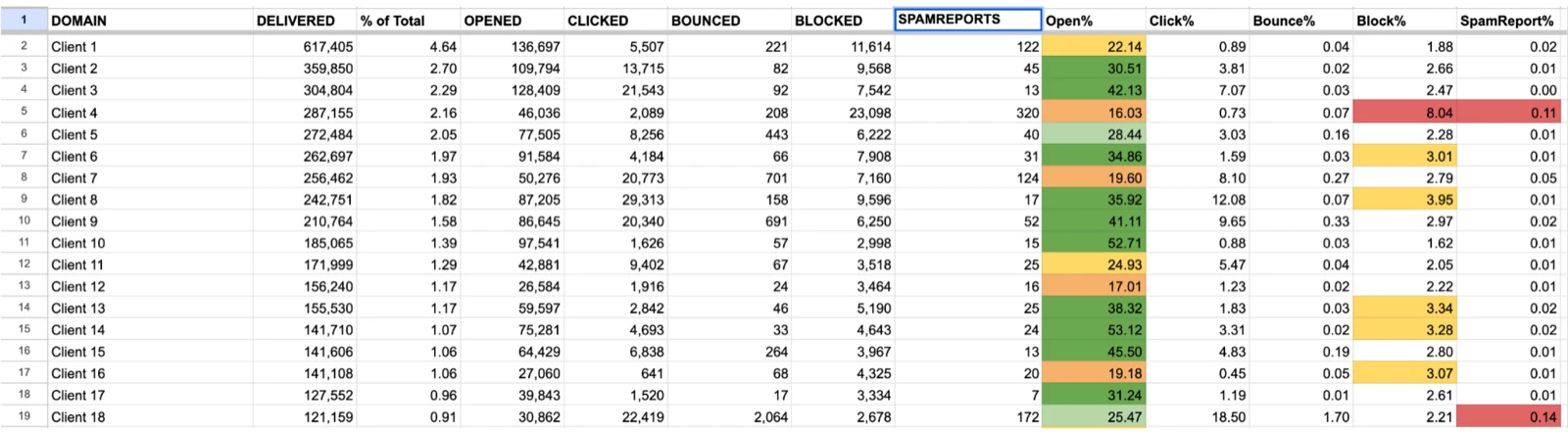
Take an audit we ran for a multi-tenant marketing platform. Its overall delivery was above 97% and its open rate across the network was 31%, so nothing looked wrong from the top. Then we split the numbers by mailbox provider. Gmail opens were about 23%, eight points under the network average, and we estimated that fixing Gmail alone was worth more than 100,000 extra opens a week. Microsoft opens were 15 to 18%, against the 35 to 40% we expect from a healthy sender, and Microsoft was blocking one of the platform’s IPs.
The infrastructure had gaps of the same kind. Volume was spread unevenly across six IPs, and the top IP had nearly twice as many blocks as the others. The widest gap was between the platform’s own customers, whose open rates ranged from 16% to 60% on the same infrastructure.
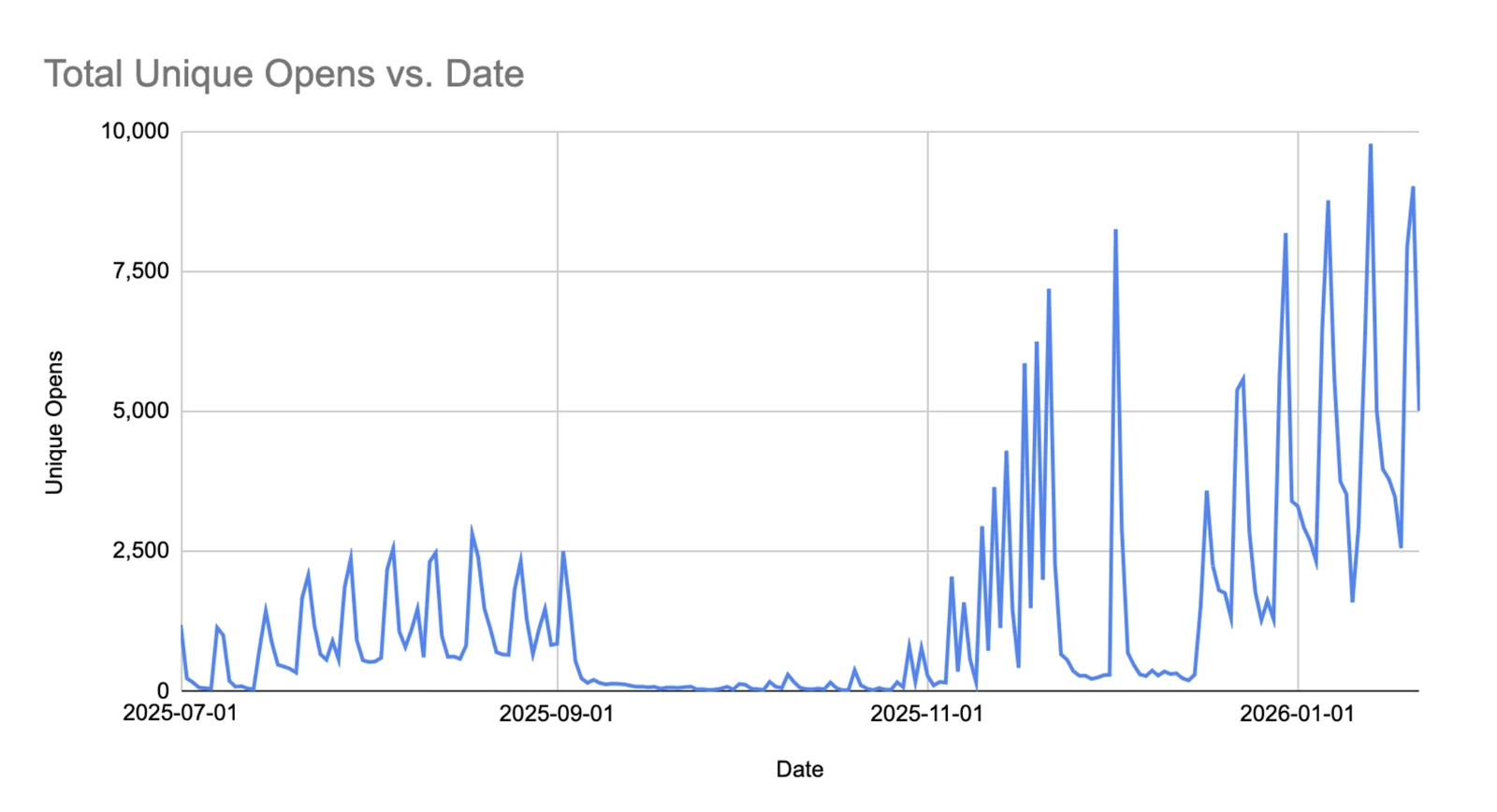
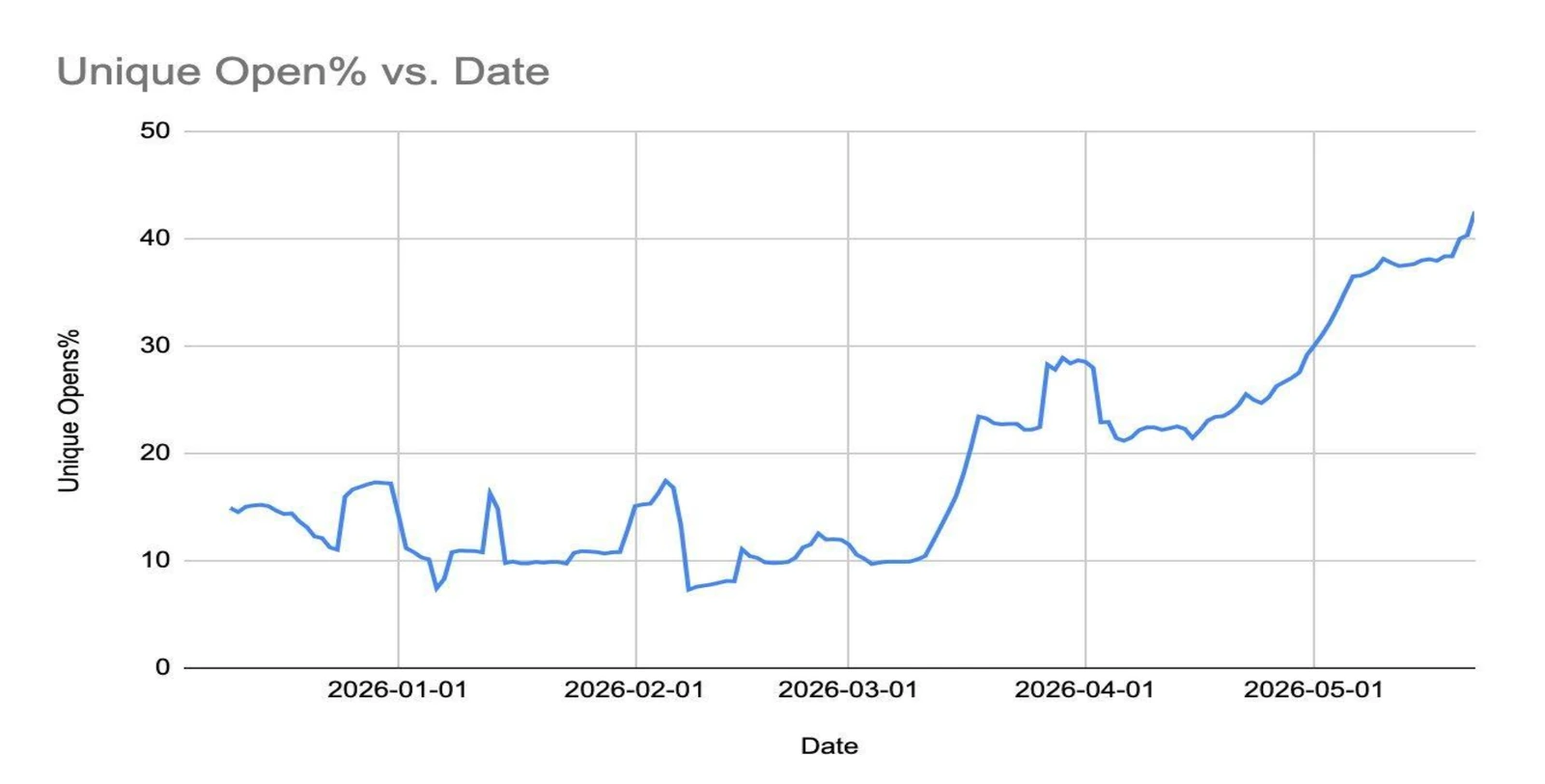
One sender came to us with 85% of its mail blocked and open rates under 15%. We paused the domain, restarted with its most engaged contacts and rebuilt the volume slowly. Blocking fell to nearly zero and open rates settled in the low 30s. The first chart below shows the part I care about most, which is more unique opens than the sender ever had on 75% fewer messages. The second shows the largest sender on a multi-tenant email platform, and more results are on our case studies page.
What an email deliverability consultant does
An email deliverability consultant goes through your whole email program, finds what keeps your mail out of the inbox and fixes it with small, targeted changes. The work covers how you send, who you send to, your authentication and security, and your standing with mailbox providers.
We work with the tech stack you already have, and we look for the changes that give the biggest improvement for the least effort from your team. Those are usually tweaks to email content, database segmentation, sending sequences, the way mail is split across domains, subdomains and IPs, and sunsetting policies. The changes are small on purpose. “Rather than taking a big machete, we’re trying to take a scalpel and make small changes where they’re needed,” says Luke Martinez, our Head of Deliverability.

Part of the job is separating delivery from deliverability. Delivered means the receiving server accepted the message, and it tells you nothing about which folder the message landed in. A 99% delivery rate can sit next to a 5% open rate, which is why the 97% in the audit above told us so little.
Security is part of it too, because you can’t reach the inbox while fraudsters are abusing your domain. A mailbox provider that sees phishing sent in your name can start blocking your legitimate mail along with it. That is why we cover both. Luke has 12 years of experience in email deliverability, including his time at SendGrid, and he covers reputation and sending strategy. I cover email security, DNS and IT configuration.
We also talk to Google, Microsoft, Yahoo and other spam filter providers on your behalf, so they treat your mail properly on their end. We don’t sell software, and what you get from our email deliverability consulting is expertise and guidance from people who join your team for the length of the work. We talk to everyone who touches email, which often means marketing, product, sales and IT, and we need someone on your side working with us.
How a deliverability engagement works
An engagement runs from a baseline review and an audit, through fixes and monitoring, to a handoff your team can run without us. Most of the visible change happens in the first two to three months.
| Phase | What happens | Typical timing |
|---|---|---|
| Baseline review | A short review of your campaign data and inbox placement | Before we give any estimate |
| Discovery | How you send, how you found the problem, which metric you watch | First call |
| Audit | Results by mailbox provider, every sending system, authentication, content and audience, written up as a report | Start of almost every engagement |
| Kickoff | Access, the statistics we’re trying to improve, where you want to end up | Can be the day after the engagement letter is signed |
| Fixes | Small changes to content, segmentation, sequences and sunsetting; blocklist replies | First improvements usually by the end of the first month; heavy lifting in the first two to three months |
| Monitoring | Stats reviews and daily checks after DMARC changes | At least weekly; two weeks before a reject policy |
| Handoff | Onboarding guide, deliverability guideline, DNS export file | At the end; engagements are usually month-to-month |
Talk to us
If your mail isn’t reaching the inbox, book a call and we’ll start with your numbers.
Book a CallBaseline review and discovery
We start with a short review of your campaign data and inbox placement, so any estimate we give is based on your real numbers. The first call is mostly questions about how you send, how you knew you had a problem and which metric you have been watching. What I can’t do on that call is tell you the cause. Blocked email can come from IP reputation, domain reputation, the mail server configuration or a security policy, and from the outside those look alike.
Audit
Almost all of our engagements start with an audit, and it is mostly fact finding. It covers your results by mailbox provider, every system that sends mail for you, your authentication, your content and your audience. We also join your list and receive five to 10 emails the same way your recipients do. The findings go into a report that some clients act on themselves, and we describe the process in Email Deliverability Audit: What It Is and When You Need One.
Kickoff
Once the engagement letter is signed, kickoff can be the next day. It’s a deeper call about access, the statistics we are trying to improve and where you want to end up. We ask for read-only or the minimum level of access on your sending platforms, or we work in screen-share sessions and never log in at all. Then we catalog every mail stream you have, so that nothing we later tell a mailbox provider or a blocklist turns out to be wrong.
Fixes
The first fix is sometimes to stop sending. With the sender whose mail was 85% blocked, Luke’s first recommendation was to pause the domain, because mailbox providers count blocked and spam-foldered mail against you. As he put it to the client: “Each one of those is actually digging a hole deeper. So we need to stop digging.” The domain sent no bulk email for two weeks, and about a week in, its ordinary one-to-one emails stopped being rejected.
During that pause we contacted the postmaster teams at Gmail, Yahoo and Microsoft. People often expect this to be a consultant’s first step, but a mailbox provider will not lift a block just because we ask, and it can check our claims against its own data. So we make the changes first and contact the providers second, with something true to tell them. We explain how that works at Microsoft in Why Microsoft Blocks Your Email and How to Get Unblocked.
Then we warmed the domain back up. The first campaigns went to a few hundred people who had opened recently, and we raised the volume by 30 to 40% per campaign on a fixed schedule, because spam filters reward predictability. Part of my job in those weeks was saying no. Once the numbers looked good, the client wanted to email its whole database from a different email platform, and I asked them to wait. Reputation is built per platform, so a large send from a service where the domain had no history could have undone the work.
Blocklist cases follow the same order. For a B2B software company listed on SURBL, we checked every domain in its mailing list and found that 20 of about 70,000 pointed to known spam-trap mail servers. We suppressed those addresses before we replied to the blocklist, and the domain was delisted. We write every reply with you in our SURBL delisting service, but the replies themselves have to come from your organization.
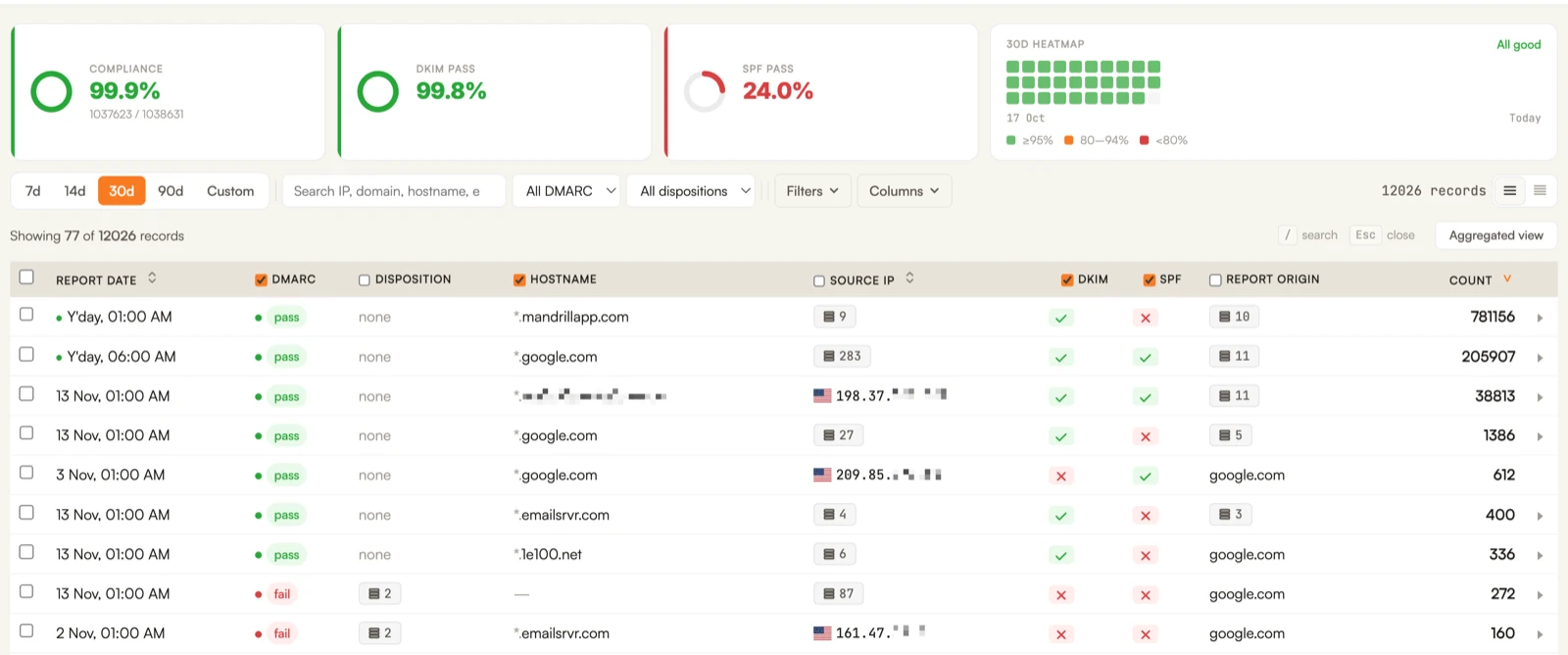
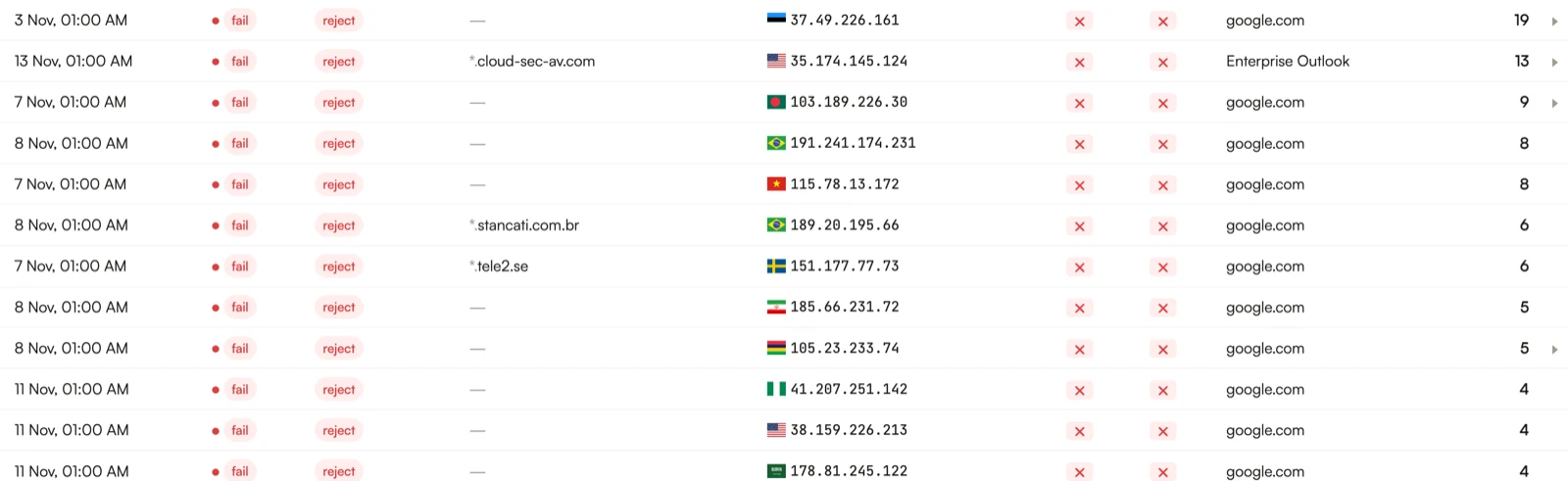
The security fixes run alongside. For the sender above, DMARC reports showed a newer marketing platform failing SPF and DKIM, and servers in several countries sending mail that claimed to come from its domain. We fixed the platform’s configuration and then moved DMARC to enforcement, so the forged mail is now rejected.
Monitoring
During an engagement we review your statistics at least weekly, because a monthly look is too slow to catch problems early. DMARC is the clearest example of why we monitor. Setting a reject policy is a DNS change that takes seconds, but we watch the reports for two weeks first and check every day that legitimate mail still passes.

Handoff
Engagements are usually month-to-month with no hard deadline, and they end with a handoff. You get an onboarding guide, a deliverability guideline and a DNS export file. The export file matters when your website provider also runs your DNS, because those providers often don’t hand over the configuration when you leave. It lists every policy and protocol, so you can import the whole setup at another DNS host.
What to expect and when
The first improvements are usually visible by the end of the first month, and the heavy lifting is done within two to three months. After that the work is mostly maintenance.
By the end of the second month we typically see engagement metrics double. The scope depends on how complex your setup is, and a company sending mostly from one platform is a more straightforward engagement than one with custom-built infrastructure. Some problems run on their own clocks. A blocklist delisting usually takes from a couple of days to a couple of weeks. For one client with Microsoft blocks, Luke estimated about eight weeks for the whole email program to recover if things went smoothly and 10 to 12 if they went sideways.
How we compare to tools, provider support and an in-house hire
Tools show you symptoms, your provider’s support covers its own platform, and an in-house hire tends to look for engineering fixes. We work across every mail stream you have and treat tool results as one input among several.
Inbox testing tools are useful, and they have limits. Only seed testing can show which tab or folder your mail lands in, and seed testing has its flaws. A good consultant can build a strategy, KPIs and milestones from what a tool like GlockApps shows, as long as it isn’t the only source of data. Scores are similar, and we have fixed clients’ spam folder placement while a third-party score stayed the same.
Your email provider’s support is the second option. Some providers sell their own deliverability services, and SendGrid’s paid consulting, for example, is one consulting session a month plus basic reports. We also work across your other mail streams and talk to Google, Microsoft and Yahoo for you. We compare the two in SendGrid Professional Services vs. Independent Email Deliverability Consulting.
The third option is to hire. An engineer who really understands email is a strong person to have on a team, but engineers tend to look for engineering solutions. In Luke’s experience these are usually human problems about address collection and cadence. Some work needs a person on your side either way, and we don’t recommend a DMARC reject policy unless someone on your team checks the reports for malicious traffic at least once a month.
Warning signs to watch for
The clearest warning signs are an open rate below 20% and a spam complaint rate above 0.1%. A long, slow decline in opens counts too, even when no single week looks bad.
As a rule of thumb, an open rate below 20% means there are problems, and a single-digit rate means a big one. Bots inflate open rates, so read them as a signal and not as an exact number. The slide can be slow enough to miss, and one prospect told us its open rate had fallen from around 20% to low single digits over a few years.
Watch your complaint rate as well. Keep it under 0.1%, because at 0.3% you are in violation of Google’s and Yahoo’s sender rules. Complaints often come from stacked sequences, where one recipient gets five to six emails a week, starts marking them as spam, and engagement drops off. The opposite pattern is a risk too. If you send little email or send it irregularly, filters treat you as suspicious.
Be careful with the usual quick fixes. No reputable blocklist charges for delisting, and nobody can find every spam trap in a list, only the high-confidence ones. A new domain is not a fix either, because filters can read the same sender on a new domain as a compromised account or as spoofing and block it.
How you know the work is paying off
You know the work is paying off when more people open and click your email, especially at the mailbox providers where you were weak. We watch opens and clicks before reputation labels and third-party scores.
Luke told one client: “I don’t really care if your reputation went from high to medium or low to bad. The open rate dropped.” A third-party score can also stay flat while your mail moves from spam to the inbox, and a percentage can look good on a tiny send. That is why we look at the total number of people opening, as in the unique opens chart at the top of this post.
A case from Luke’s years at SendGrid shows the pattern. Open rates on one of a large sender’s mail streams dropped sharply overnight because Gmail had started filtering it to spam, and it took about a week to find the cause and another week to fix it. After a database cleanup, a lower cadence, sunsetting of long-inactive users and a form submitted to Gmail, the results came back slightly better than before.