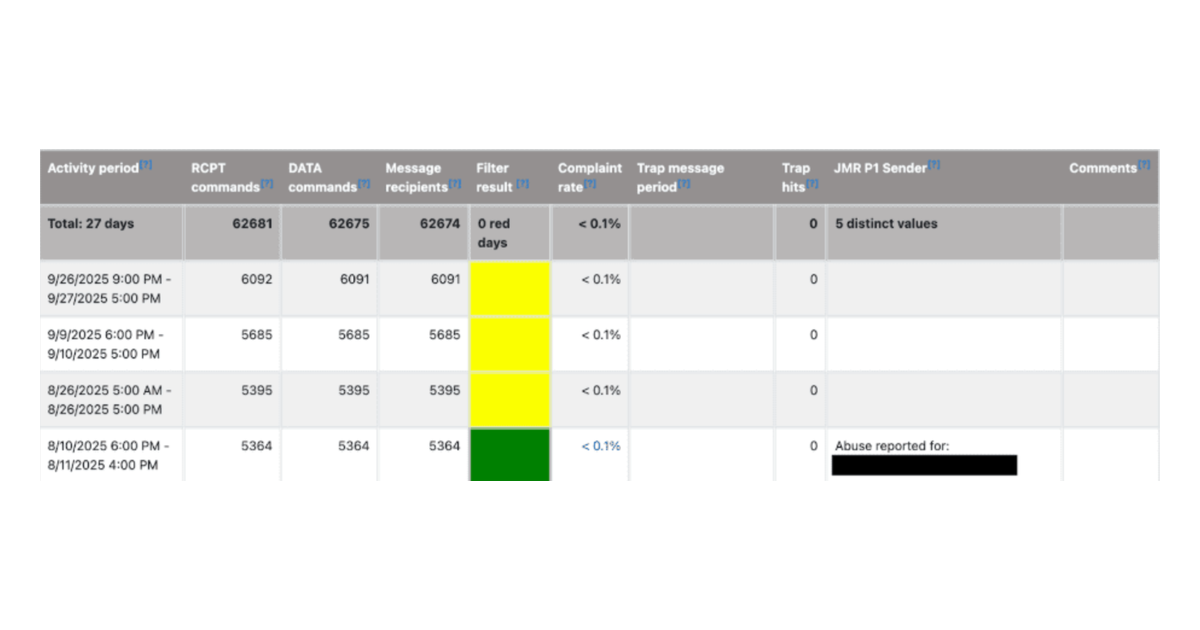


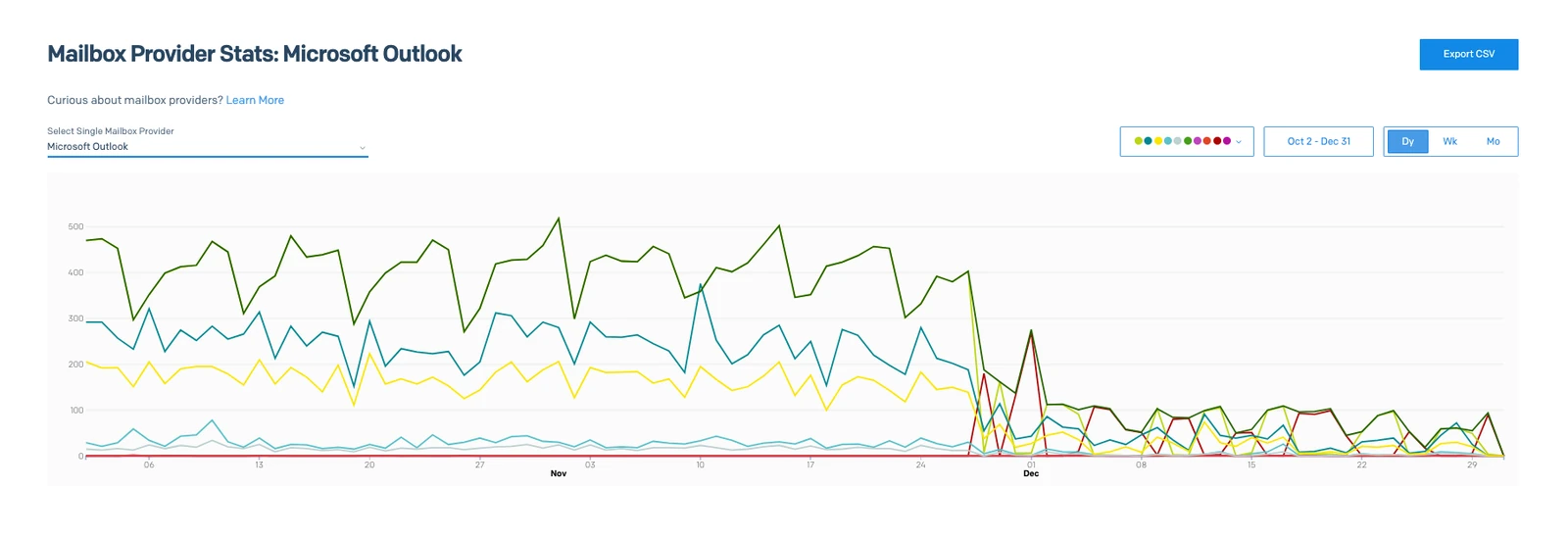
A client came to us with what they called an Outlook and Hotmail ban. Their company sends around 9,000 automated alert emails a day from its own application, through SendGrid, on dedicated IPs. About 410 of those went to Microsoft addresses. On November 28, 2025, Microsoft started rejecting them, and from then on about 40 a day got through.
The odd thing was that nothing else was wrong. Gmail, Yahoo and Google Workspace were all accepting their mail without trouble. Overall open rates were above 50% and there were almost no spam reports.
By the time we were brought in, the block had been in place for over a month. We got it lifted within a week of opening a case with Microsoft. Along the way we found a handful of things that affect email deliverability to Outlook and Hotmail for any sender.
Blocked by Microsoft or filtered to the junk folder
The two need different fixes, so start here.
A block is the easier one to spot. In SendGrid we filtered the activity down to blocked events going to hotmail.com, and the same rejection reason came back again and again. It pointed at the sending IPs. Luke Martinez, our head of deliverability, told the client on the first call: “We’re definitely on a list somewhere.”
This is the client’s Microsoft view in SendGrid from October to December. The dark green line is mail sent to Microsoft addresses, the lighter green is what was delivered, and red is blocks. Everything changes on November 28.
Junk folder placement gives you no error at all. Microsoft accepts the message, and you only notice because your Microsoft open rates sag compared to everyone else’s. There is more on reading those numbers further down.
How a bounce rule made the Microsoft block worse
SendGrid reports two different things as a bounce. If the type is “bounce”, the address is invalid. If the type is “blocked”, it can be anything from a full mailbox to a temporary problem to your IP sitting on a blacklist.
The client’s system never looked at the type. A couple of years earlier they had trouble with invalid addresses, so they built a rule that deleted any contact that bounced. When Microsoft started blocking, the rule did what it was built to do and began deleting their Microsoft subscribers. Before the block, the application sent about 410 messages a day to Microsoft addresses. Within a week it was down to about 100, and Microsoft was rejecting most of those.

SendGrid will not stop you from doing this. Luke helped design those bounce events, and he describes SendGrid’s attitude as hands off: “We’ll tell you what happened. But if you want to keep sending to bounced addresses, knock yourself out.” So suppress only the bounces that mean an invalid address, and never remove someone because of a block. Pause sending to that provider while you investigate, but keep the contacts.
What caused the Microsoft block
The client asked whether we could find out how they got on the list. There isn’t a precise way. Microsoft’s SNDS portal gives clues, but it rarely tells you exactly what you did.
When blocking kicks up out of the blue, we would expect to see spam reports or bounces climbing in the weeks before, or open rates plummeting. None of that was there. In the 30 days before the block, mail to Microsoft addresses produced zero blocks, zero bounces and zero spam reports. False positives happen, and it could simply be that Microsoft’s filters got a whiff of something.
Once we had full access, though, we found several things that were not helping.
A dedicated IP gets you about 90% of the way to being judged on your own behavior. The rest depends on the neighborhood, because you can still be judged on the range your IP sits in. SendGrid looks after its ranges and it is rare for a whole block of IPs to have delivery trouble, but it has happened.
Engagement had been slipping as well. Microsoft open rates slid from 46% in September to 38% in the last week before the block. Gmail went from 57% to 51% over the same months. The client had started sending alerts to everyone who registered on their site. Before that, alerts only went to people their team already knew.
Some of their domains were authenticated in one of their two SendGrid accounts and missing from the other. On one domain, 2,100 emails had gone out failing both DKIM and SPF. The automated emails had no List-Unsubscribe header. And the near-zero spam report count was less comforting than it looked, because sometimes that just means the mail is landing in the spam folder.
There had also been a warning on their second SendGrid account, the one that sends the newsletter. On August 12, 2025, Microsoft blocked half of that day’s newsletter to its users: 1,131 messages blocked and 1,117 delivered. Two weeks later the blocks were gone.
As Luke told the client, you are never going to have zero negative signals. We need to minimize those and then maximize the good ones.
What does not fix a Microsoft block
Before we got involved, the client was about to buy three more dedicated IPs. After we talked, they dropped the idea. The IPs they already had were warm and, Microsoft aside, had a good reputation.
Having two IPs on the account does not protect you either. SendGrid more or less round-robins between them. It has some logic to pick the better IP, but it is not going to use the one that works and ignore the one that doesn’t.
We also heard that mail to a local university never arrived. When we checked, no send had gone to more than about seven .edu addresses, which is not enough signal to conclude anything. We look at the top five mailbox providers for each sender first, and at anything obviously broken, such as not reaching Microsoft at all.
How we got the Microsoft block lifted
Microsoft will lift a block, but you have to give them a reason. We make some changes first, even small ones, and then tell Microsoft’s team that the mail is wanted and what we have done about it. “You give them enough of a carrot,” Luke says, “and they will mitigate the IP.”
In this case the client had a rule that stopped mailing anyone who had not opened in 60 days, and they were rebuilding their bounce handling. We waited for them to confirm the 60-day rule in writing before we contacted Microsoft. We were not going to tell Microsoft we were doing everything we could if we weren’t.
We expected a reply within a day and a resolution in three or four. It took just under a week. Microsoft confirmed they had mitigated the IPs, and we told the client to allow another 24 hours for it to take effect.
After that you are on a short leash. Luke’s note to the client that day said it is “really important to keep things tight and avoid red flags like over-mailing, excessive spam reports and bounces.” You get fewer chances the next time.
Reading your Microsoft open rates
Microsoft opens will never be as high as Gmail’s. Microsoft is more aggressive about turning images off by default, and if the reader doesn’t click to show images, the tracking pixel never loads. We expect Microsoft to run about 10 to 15% below Gmail. That is a relative difference, so 50% at Gmail would be roughly 43 to 45% at Microsoft.
On this client’s alerts, Microsoft ran 18% below Gmail over the six months before the block: 44% against 54%. In the last month the gap widened to 22%. That is a bit more than image blocking explains, and it was getting worse.
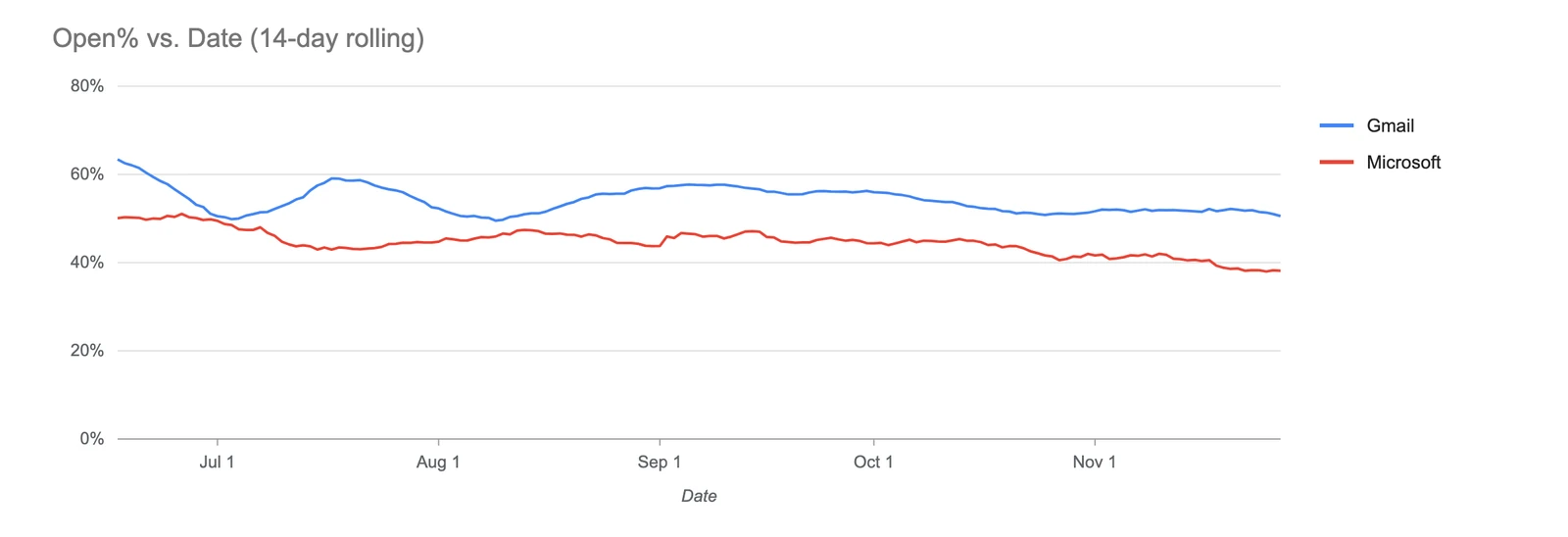
Their newsletter was much worse. Gmail opened at 70% and Microsoft at 33%, less than half. The overall open rate was 63%, which looked great, but that was mostly Gmail carrying the average. If you only look at the total you will miss this, so break your stats out by mailbox provider.

We use open rate as a proxy for inbox placement. Don’t read it as an exact count of people who have actually opened. What matters is whether it is going up or down over time. Once it dips into the 20s, you are probably seeing mail in the spam folder.
Be careful how you calculate it, too. Opens are counted on the day they happen, which is often not the day the email went out. This client sends a big newsletter and then almost nothing for days, so the day after a send shows a couple of dozen delivered emails and thousands of opens. One day in their data works out to an open rate above 21,000%. Luke normally smooths open rates with a 5-day rolling average. Here he needed 14 days and a cap on the chart axis, because, in his words, “I was still getting 2000% open rates and stuff like that.” The safe way is to add up opens and delivered emails across the whole window and divide the totals.
Think of open rates as a health check. Your open rate is a very important metric, but it’s total opens that pay the bills. An 80% open rate seems impressive, but if you can get more total opens at a 35% open rate while keeping other metrics like bounces, spam reports, and unsubscribes healthy, we’ll take the 35% open rate every time!
What to fix to protect your email deliverability at Microsoft
Authentication comes first. Every platform that sends mail for your domain needs DKIM and SPF set up, including the second account somebody forgot about. A test message from this client failed DKIM and still reached the inbox, because their reputation was solid. Luke’s comment was that it is “weight on the wrong side of the scale. It’s not a guaranteed death sentence, but we want to stack as much stuff on the good side as we can.”
Then DMARC. Their policy was set to none, and the reports showed mail being sent in their name from servers in the Netherlands, Vietnam and Taiwan. With a policy of none, nothing happens to those emails. Anyone can send from your domain with phishing links in the message. Once all of your legitimate sources pass, enforce the policy so everything else gets blocked.
Keep a sunset rule. The 60-day cutoff explained a lot about why this client’s open rates were as healthy as they were. Where engagement is slipping, do a one-time purge of people who have not engaged in a long time, and then keep the rule running.
Add the List-Unsubscribe header. We did not need it to get the Microsoft block lifted, but it is one of the few requirements the mailbox providers spell out explicitly in their best-practice documents, so it was high on our list. It is two headers:
List-Unsubscribe-Post: List-Unsubscribe=One-Click
List-Unsubscribe: <https://example.com/unsubscribe/example>
The URL has to actually unsubscribe that recipient. Put the headers on anything that can be sent automatically. A message that a person writes and sends by hand doesn’t need them.
Last, look at the content. The fewer calls to action in an email, the better it converts. If you pack 15 or 20 items into one email, most of it gets clipped, and the open pixel doesn’t load unless the reader chooses to view the whole message. Use the pre-header too. That is the bit of text that shows after the subject line before the email is opened. Keep it short and write it to get the open.
Is Microsoft worth the effort?
That depends on how much of your list is there. On this client’s newsletter, about 2% of recipients were at Microsoft domains. Getting Microsoft up to where it should be would have added roughly 1,000 opens a month, on a newsletter that already gets about 100,000.
Their automated alerts were a different matter. Microsoft was only about 4% of that volume, but those messages were being rejected outright. Having mail blocked, as Luke said on our first call, is just a bad look for the brand.