

Your delivery rate says 98%. Your open rate says otherwise.
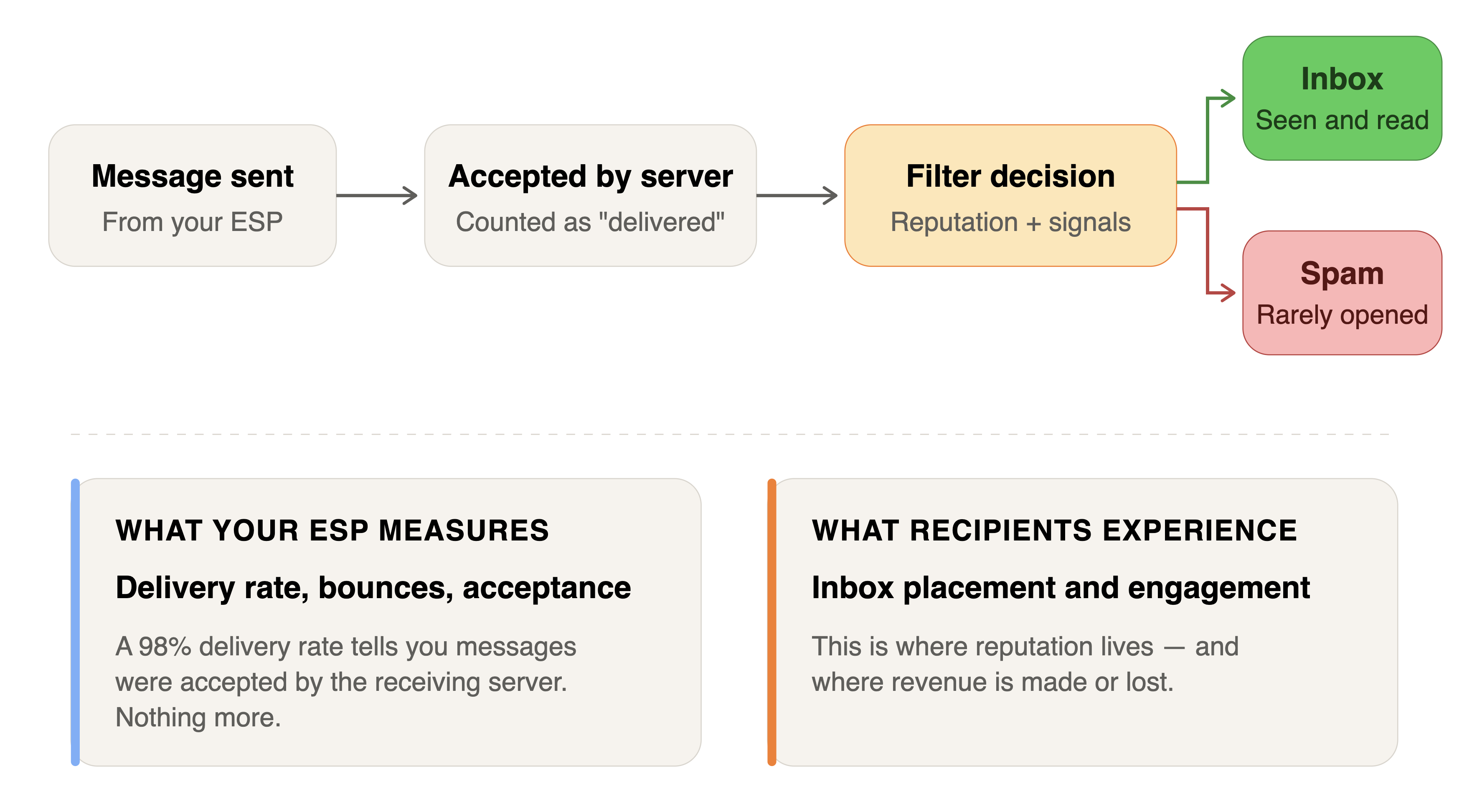
Most senders don't realize their emails are landing in spam until the damage is well underway. The delivery rate looks fine — the receiving server accepted the message. But acceptance and inbox placement are two completely different things. A message can be "delivered" straight into the spam folder, and your ESP will still count it as a success.
The gap between delivered and seen is where reputation lives. And reputation is what determines whether your next message reaches the inbox or disappears into a folder your recipients never check.
Here's what actually causes emails to land in spam, based on what we consistently find when auditing email programs — and how to fix each one.
Your Domain Reputation Has Dropped
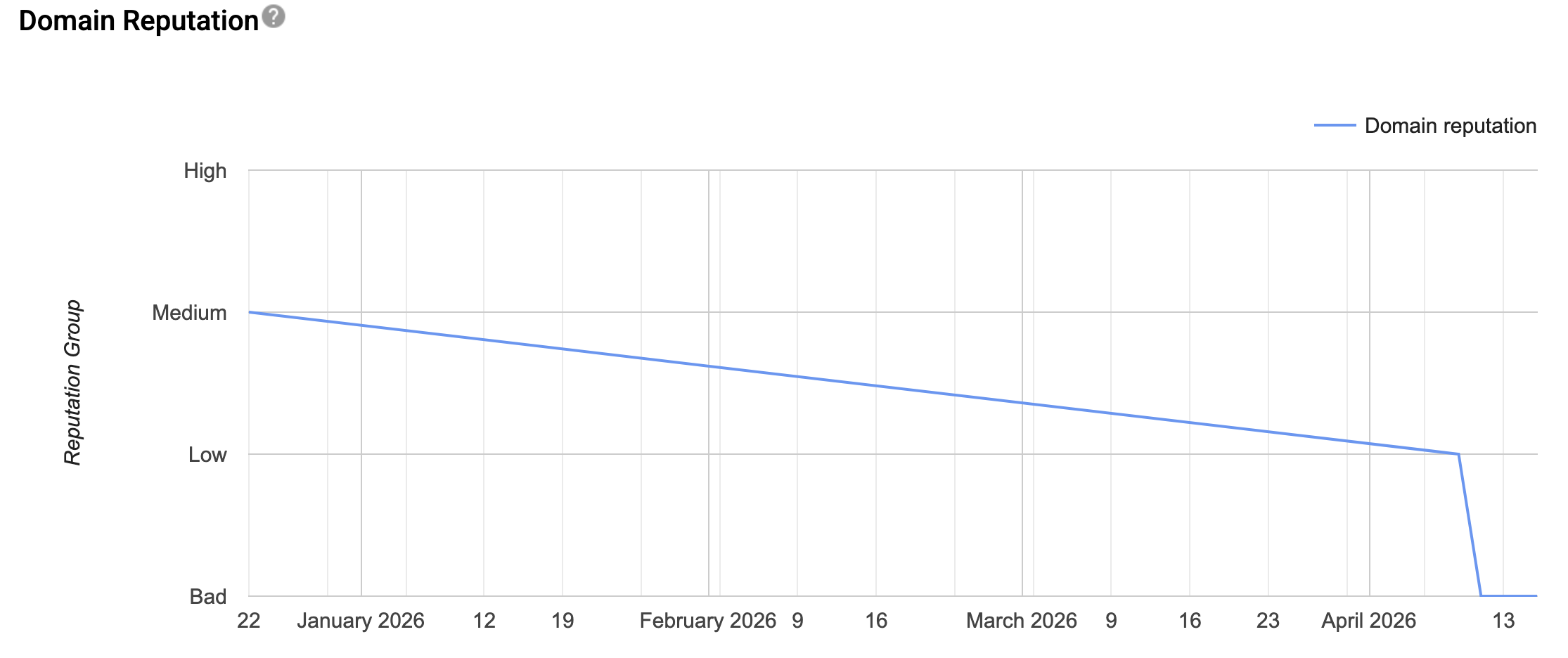
Domain reputation is the single most important factor in inbox placement decisions at Gmail, and it carries significant weight with other providers too. Google Postmaster Tools rates your domain on a four-tier scale: High, Medium, Low, and Bad. If your domain drops below Medium, you can expect more than half your messages to land in spam. If you're specifically dealing with Gmail dropping your messages into spam, the Postmaster Tools signals are usually where the diagnosis starts.
The problem is that domain reputation can decline gradually. Open rates slide a few percentage points per month. You attribute it to seasonality or content fatigue. Then one day you check Postmaster Tools and discover your reputation dropped from High to Medium three weeks ago — or worse, from Medium to Low.
What drives reputation down is the cumulative effect of negative signals: spam complaints, low engagement, high bounce rates, and messages to recipients who never open. Domain reputation reflects everything sent from your domain, across every platform and every mail stream. A poorly performing marketing campaign on one platform can drag down the transactional email you send from another.
How to fix it: Monitor Google Postmaster Tools weekly at minimum. If you see your domain reputation drop a tier, treat it as urgent. The immediate response is to reduce volume and target only recently engaged recipients for three to four weeks. This concentrates positive signals (opens, clicks) and starves the negative ones (unopened messages, complaints). Once reputation stabilizes, you can carefully expand your audience again.
You're Not Sunsetting Unengaged Recipients
This is the most common finding across every audit we conduct. Senders keep mailing addresses that haven't opened or clicked in months — sometimes years. Every message sent to an unengaged address is a negative signal. Mailbox providers track the ratio of engaged to unengaged recipients across your sending domain and IP addresses. When too many of your messages go unopened, the filters conclude that your email is unwanted and start routing it to spam.
The well-established best practice is engagement-based sunsetting: stop sending to any address that hasn't opened or clicked within a defined window. Six months is a common starting point, but this should be adjusted based on your reputation signals. When reputation is strong, you can extend the window. When things are deteriorating, tighten it to 60 or 90 days.
For platforms that send on behalf of many users, this is especially critical. Each individual sender's engagement patterns contribute to the shared reputation. A single client sending high volume to an unengaged list can depress open rates and damage IP reputation for every other sender on your infrastructure.
How to fix it: Implement a sunsetting policy that suppresses addresses after a defined period of non-engagement. Start with six months if you have nothing in place today. For addresses that have never engaged, be more aggressive — don't mail them more than two or three times before suppressing. If you're on SendGrid, use the Engagement Quality (SEQ) Score API to monitor engagement health across subusers on a daily basis.
Get the free Email Deliverability Guide
15 rules for reaching the inbox. Used by 450+ organizations.
Download the GuideYour Email Authentication Is Broken or Incomplete
SPF, DKIM, and DMARC are the three pillars of email authentication. Most senders have SPF and DKIM configured — they're required by virtually every ESP. But "configured" doesn't mean "configured correctly," and it doesn't mean the configuration is still valid.
Authentication breaks silently. Companies migrate website providers, switch CRMs, change IDX platforms, or restructure their email infrastructure, and someone forgets to update the DNS records. DKIM starts failing. SPF includes entries for services that are no longer in use. DMARC records have typos, or there are two DMARC records on the same domain (which is invalid). We've found all of these in production environments sending millions of messages.
The specific problems vary, but the pattern is consistent: authentication was set up once, and nobody verified it after the environment changed.
Beyond SPF, DKIM, and DMARC, there are additional protocols that increasingly matter. DMARC set to p=none meets the minimum requirement but provides no protection against spoofing — anyone can send email pretending to be your domain, and those messages will be delivered. MTA-STS protects your email in transit from interception. TLS-RPT gives you visibility into TLS connection failures. DNSSEC authenticates DNS responses. None of these are strictly required for deliverability today, but they're quickly becoming industry standards, and they each close a specific vulnerability that could eventually impact your sending reputation.
How to fix it: Audit every sending domain's authentication records — not just your primary domain, but every domain used by every client or service sending through your infrastructure. Verify DKIM, SPF, and DMARC are valid, correctly formatted, and aligned with your current sending environment. If DMARC is set to p=none, create a plan to move toward p=quarantine or p=reject after monitoring DMARC reports to ensure all legitimate mail streams are properly authenticated.
Your Domain Is Being Spoofed
If your DMARC policy is set to p=none and you don't have reporting configured, bad actors can send email pretending to be your domain — and you'll never know it's happening. These spoofed messages typically contain phishing links, password reset scams, or malicious attachments. They get delivered, recipients mark them as spam (or worse), and the reputation damage lands on your domain.
We see this more often than most people expect. In our experience, roughly 30% of domains we audit show evidence of active spoofing or impersonation attempts. Usually the volume is low — a few dozen messages from IP addresses in random countries — but if it goes unaddressed, attackers ramp up. The spoofed traffic generates negative signals that your legitimate email has to overcome.
How to fix it: Enable DMARC reporting by adding rua and ruf tags to your DMARC record. Use a DMARC monitoring service to analyze the reports and identify unauthorized senders. Once you've confirmed that all legitimate mail streams pass authentication, enforce your DMARC policy by moving to p=reject. This tells receiving servers to block any message that fails authentication — which stops spoofed email from being delivered and protects your domain reputation.
Your IP Reputation Is Damaged
IP reputation matters most at Microsoft, which relies heavily on it for spam filtering decisions. But it's a factor everywhere. Your IP reputation is the aggregate result of every message sent from that IP address — the engagement rates, the complaint rates, the bounce rates, and the spam trap hits.
For senders on dedicated IPs, reputation is entirely within your control. For senders on shared IPs (common with lower-tier ESP plans), your reputation is pooled with every other sender on that IP. If another sender on your shared IP behaves badly, your email suffers too.
We've audited accounts where some IP addresses generate a 21% open rate while others on the same account produce 3.8%.
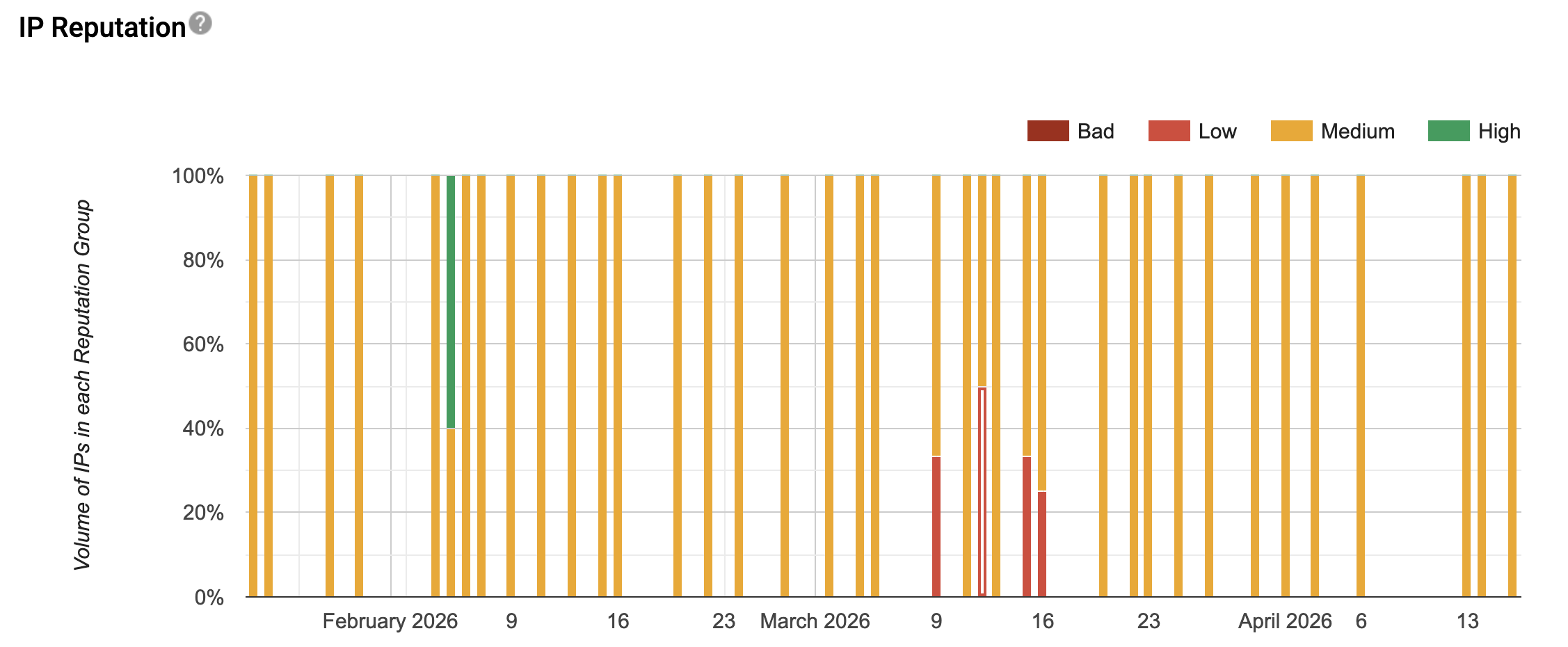
The struggling IPs have "Bad" reputation in Google Postmaster Tools while the healthy ones show "Medium" or "High." Same sender, same content, dramatically different outcomes — entirely driven by which IP address carried the traffic.
How to fix it: Check your IP reputation across multiple sources: Google Postmaster Tools, Sender Score, and Talos Intelligence. They don't always agree, and you need the complete picture. If you're on shared IPs and sending more than 50,000 messages per month, move to dedicated IPs. If you have multiple dedicated IPs, ensure volume is distributed evenly and consistently — IPs that go quiet lose their established reputation. If an IP is blocked, you'll need to address the underlying issue (usually engagement or complaint rates) before filing a mitigation request with the blocking provider.
Bad Senders on Your Platform Are Dragging Everyone Down
If you operate a platform that sends email on behalf of multiple users or clients through shared infrastructure, your reputation is the composite of everyone's behavior. A handful of bad senders can damage deliverability for your entire network.
This is one of the most consistent findings in platform audits. The data almost always shows a small number of senders responsible for the majority of reputation damage — one client generating a 4% open rate while consuming 13% of total sending volume, or two clients whose blocking spikes are responsible for an entire network's Gmail rejection rate doubling.
The math is simple but brutal: on shared IP addresses, Microsoft's spam filters see the aggregate behavior. One sender's persistent high-complaint traffic poisons the IP reputation for every other sender using it. At Gmail, domain reputation is impacted by the engagement patterns of all mail sent from that domain, so a platform's shared sending domain absorbs the negative signals from its worst performers.
How to fix it: Monitor deliverability metrics at the individual sender level, not just in aggregate. Identify your top negative contributors — the senders with the lowest open rates, highest complaint rates, and highest bounce rates — and address them directly. Solutions range from one-on-one coaching to volume caps, lead upload restrictions, IP segmentation, or in extreme cases, removal from the platform. Equally important: study your top performers to identify behaviors worth encouraging. The gap between your best and worst senders usually reveals exactly which practices to promote and which to restrict.
How SaaS platforms accidentally enable spam and phishing
A SaaS platform hosts white-labeled pages for client organizations, where end users browse products and set up notifications. When a new item is added to the platform, the system fires off an email notification.
But the email doesn't come from the client's domain - it comes from the SaaS platform's domain, with only the "friendly from" name showing the client organization's brand.
An attacker finds any publicly searchable customer-facing page through Google. They register as an end user and enable every available notification type. Then they:
- Add random email recipients
- Customize subject lines to impersonate PayPal / invoices, Stripe / password resets, etc
- Embed phishing links, etc
An instant spam bomb is distributed through legitimate Sendgrid infrastructure. Every malicious email passes through because it's coming from a "trusted" SaaS domain.
I don’t see an easy fix, but the first thing I’d do is restrict customization of notification alerts.
You're Sending More Email Than Recipients Expect
Overmailing is a reputation killer that doesn't show up as a single dramatic event. It manifests as a slow decline in engagement, a gradual increase in complaints, and a steady erosion of domain reputation over weeks and months.
The root cause is usually a lack of frequency controls. Recipients get enrolled in multiple automated workflows simultaneously. "Resend" campaigns go out to everyone who didn't open the first message — adding volume without adding value. Drip sequences overlap with batch sends. Nobody has visibility into how many messages a single recipient receives in aggregate across all campaigns.
Expectation setting matters too. If someone signs up for a monthly newsletter and starts receiving three emails per week, they're going to complain. If a user creates an account on your platform and immediately receives a barrage of onboarding emails, cross-sell campaigns, and training content simultaneously, engagement will suffer.
How to fix it: Audit your sending cadence from the recipient's perspective. How many messages is a typical recipient receiving per week across all campaigns and workflows? If you can't answer that question, you don't have adequate frequency controls. Set aggregate limits on how many messages any single recipient can receive in a given period. Pause or eliminate "resend to non-openers" campaigns — they consistently underperform and add volume that depresses your overall engagement metrics. And make sure anyone who gives you their email address knows what to expect in terms of message types and frequency.
The Common Thread
Emails land in spam because mailbox providers have concluded — based on the signals available to them — that your messages are more likely to be unwanted than wanted. Every issue on this list contributes negative signals or suppresses positive ones. Authentication failures, spam complaints, unengaged recipients, spam traps, spoofed traffic, IP reputation damage, and overmailing all push the scales in the wrong direction. Notably absent from the actual signals: the so-called 'spam trigger words' that most senders waste energy avoiding. The spam trigger word myth doesn't reflect how modern filters work — reputation and engagement do.
The fix is never a single action. It's a systematic approach: get visibility into your reputation signals, fix the infrastructure issues, clean up your sending practices, and monitor continuously. Most senders who are landing in spam don't have one big problem — they have five or six smaller ones that compound.
If you're seeing declining open rates, reputation warnings in Postmaster Tools, or feedback from recipients that your email is going to spam, an audit will tell you exactly which of these issues are affecting you and in what order to address them.
At SH Consulting, we audit email programs and fix deliverability problems for platforms and organizations that depend on email reaching the inbox. If your emails are landing in spam and you're not sure why — book a call and we'll figure it out together.
If you're seeing any of these on your platform, our email deliverability team can find the cause and fix it.