
A DMARC policy of p=reject is supposed to mean rejected. When Microsoft 365 sits behind a third-party email security gateway, it sometimes doesn't.
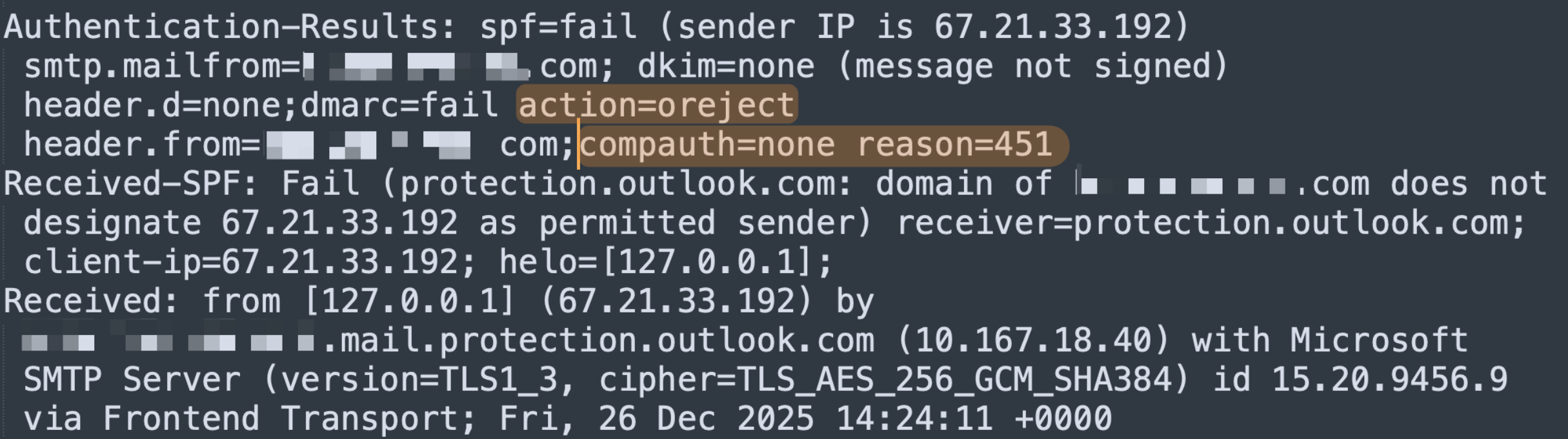
Microsoft's Exchange Online has a result code that doesn't appear in any DMARC RFC: oreject, short for override reject. It means the receiving system saw a p=reject policy, evaluated the message against it, and chose to deliver anyway. The header line on a real phishing message that reached a client's inbox earlier this year read:
Paired with:
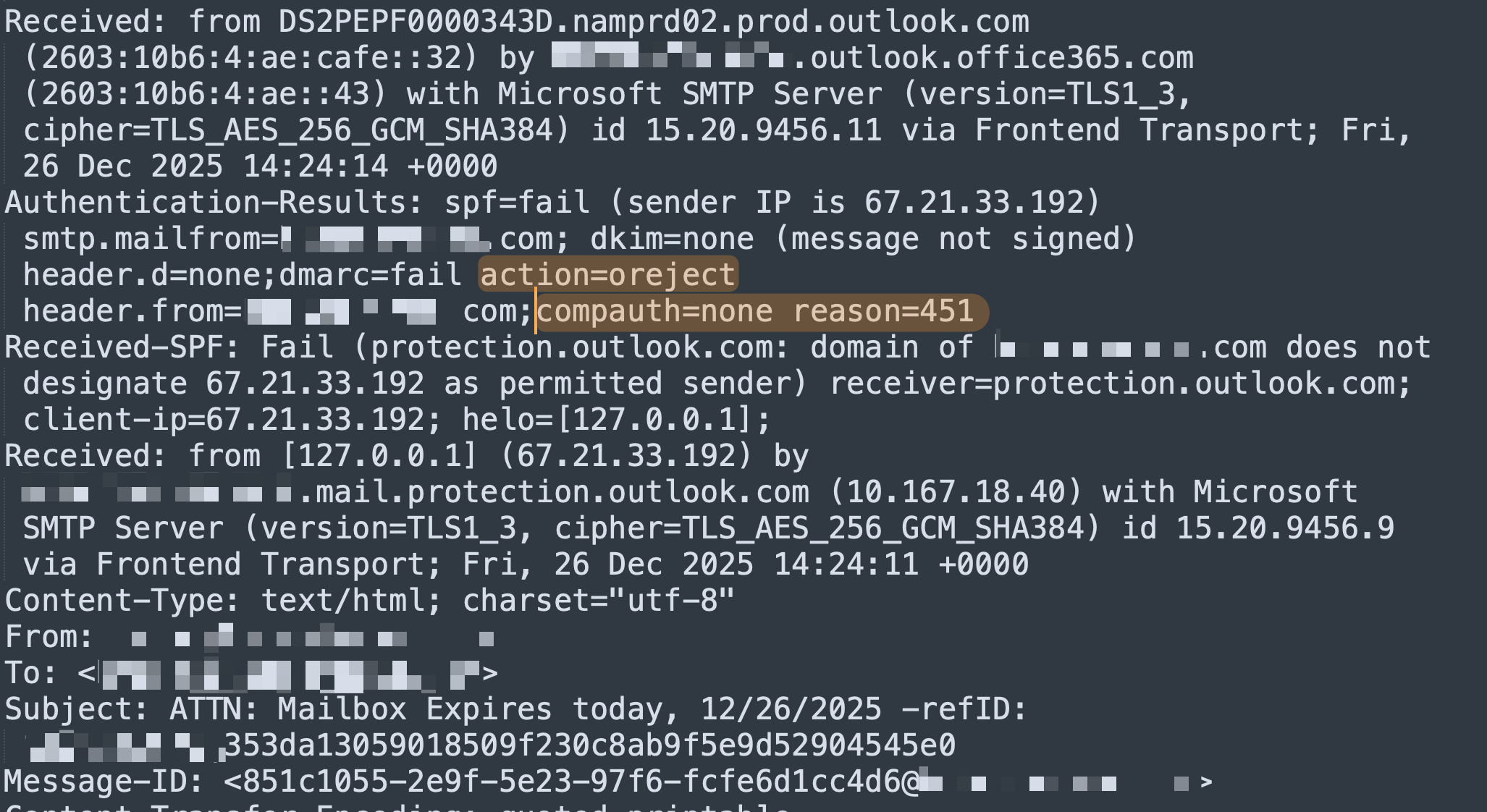
Composite authentication returning none because reason code 451 caused the receiving system to skip the check entirely. Per Microsoft's anti-spam message headers documentation, reason code 451 indicates the message bypassed composite authentication based on internal sender-intelligence signals. The DMARC verdict was computed. Then a separate layer of Microsoft's filtering logic decided to ignore it.
The combination — compauth=none reason=451 together with action=oreject — is the fingerprint. If you see it in a header, the message was delivered in spite of a p=reject policy, not because of one. And in nearly every case we've now identified, the tenant in question was running M365 behind a third-party email security gateway.
Run Microsoft 365 behind a third-party gateway? Email your domain to hello@sh.consulting and we'll tell you within 24 hours whether this bypass applies to your tenant. No call needed.
What oreject actually means
oreject is Microsoft telling you, in the header, that the receiver knew the domain owner had asked for the message to be rejected and decided not to. It's not in the DMARC specification because it isn't a DMARC action — it's a Microsoft action that runs after DMARC has been evaluated.
The trigger sits in Microsoft's composite authentication layer. When everything is working normally, composite auth combines SPF, DKIM, DMARC, and a set of internal signals into a single verdict that determines disposition. When reason code 451 fires, composite auth is skipped, and the DMARC verdict that would have driven disposition is effectively discarded. The message gets delivered with compauth=none and the override is recorded as oreject.
What gets the receiver into that code path is the more interesting question.
Why the M365 Groups framing was incomplete

In January, we published a post arguing that Microsoft 365 Groups bypass DMARC p=reject policies. The post traveled further than expected — 108,000 impressions, 88 comments — and the comments made it very clear that the framing was incomplete. Multiple senior practitioners reproduced the test scenario in their own environments and could not get the bypass to fire. In a direct-to-M365 configuration, with p=reject set, Groups did not bypass DMARC. Spoofed messages were rejected. Same-tenant spoofs were rejected. Group spoofs were rejected.

What broke the reproductions and validated the original finding was a structural difference: in the client environment where the bypass had occurred, MX records didn't point to Microsoft. They pointed to Proofpoint. Microsoft never accepted that traffic at the public edge. It received it from Proofpoint as an authenticated upstream relay, somewhere inside its own trust boundary. A separate practitioner who had reported essentially the same finding to Microsoft six months earlier confirmed the pattern — they had also been running with a third-party gateway in MX when they encountered it.
The Group wasn't the vulnerability. The Group was the surface where the symptom became visible. The actual mechanism is the receive path Microsoft sees the message arrive on.
What's actually happening
When MX points directly to Microsoft, Exchange Online accepts mail at the public internet edge. The full filtering stack — SPF, DKIM, DMARC, composite authentication, Spoof Intelligence, Defender — runs against an external connection from an arbitrary sender on the open internet. That's the configuration the protocol was designed for, and in that configuration, the protocol works.
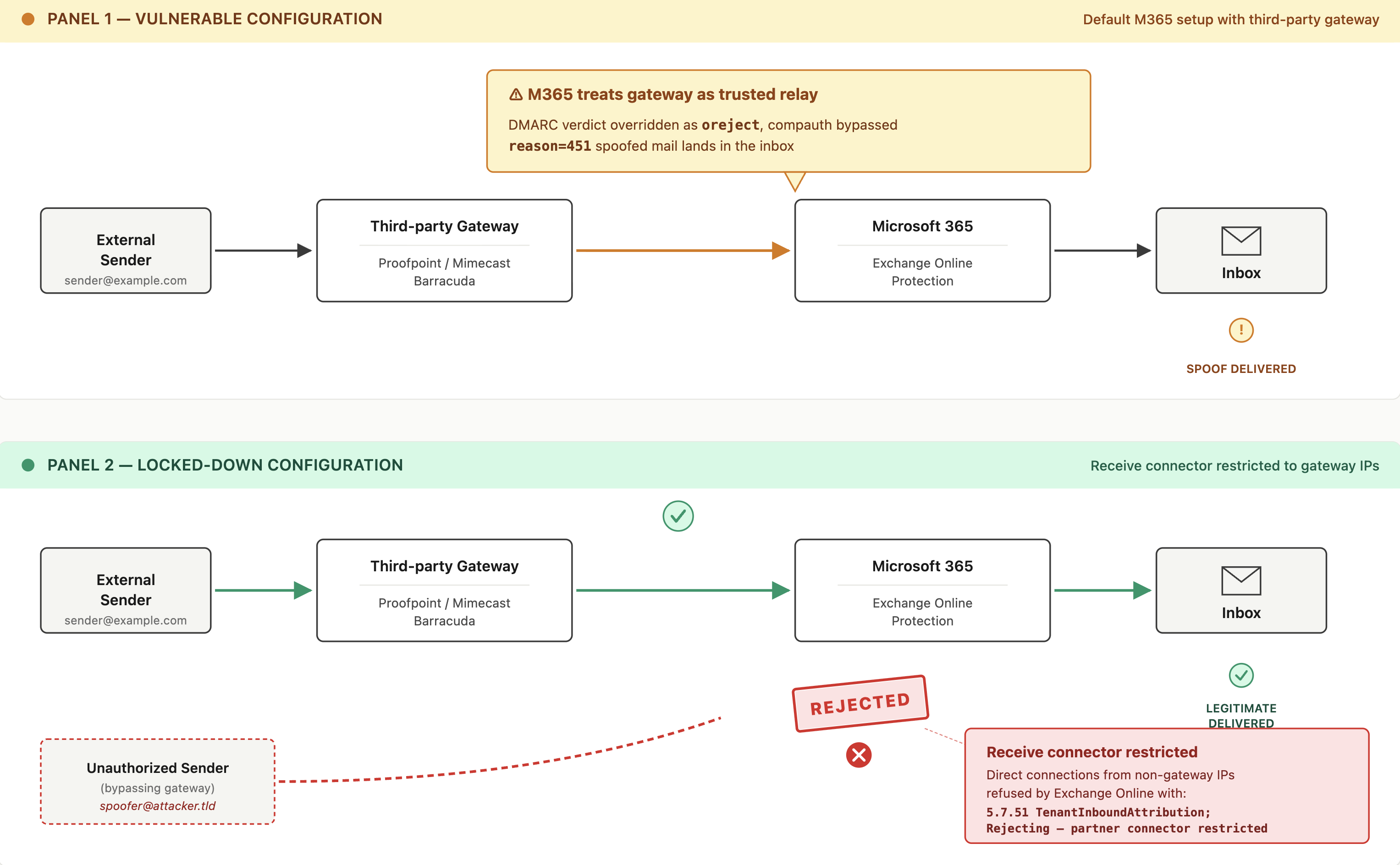
When MX points to a third-party gateway, the flow is different. The gateway accepts mail from the public internet, runs its own filtering, and forwards the surviving messages to Microsoft. Microsoft receives those messages from the gateway's IP space, not from the original sender. From Microsoft's perspective, the connecting party isn't an internet sender — it's a known relay that the tenant has authorized in its connector configuration.
Microsoft treats authorized inbound connectors as upstream relays inside the tenant's trust boundary. The composite authentication logic appears to operate on the assumption that mail arriving via an authorized connector has already been through a primary filtering layer, and applies a different set of rules than it would to a message arriving cold from the open internet.
Three mechanisms converge to produce the override:
Spoof Intelligence is permissive by default. It's designed to allow legitimate but technically misconfigured senders to deliver — particularly internal users sending from third-party platforms that don't fully authenticate. When it identifies a sender as "likely legitimate," it overrides the strict DMARC outcome. This is a load-bearing piece of Microsoft's mail flow: a large share of the legitimate mail moving through Exchange Online would fail DMARC outright if Spoof Intelligence weren't permissive about it. The obvious "just turn it off" response will break legitimate mail.

Same-domain sender and recipient inside a single tenant. Microsoft frequently treats messages where the From and To domain match — and both belong to the same tenant — as trusted by default, regardless of the published DMARC policy. The reasoning appears to be that mail "from the tenant to itself" is unlikely to be hostile. That's a reasonable heuristic right up until someone spoofs the tenant from outside and routes the message through a relay Microsoft trusts. This is the most under-appreciated trigger: it doesn't require Groups, doesn't require any unusual configuration, and applies to every internal user spoof where the relay path is trusted.
Composite authentication skips entirely. This is what reason=451 indicates. Microsoft's documentation describes 451 as the code for bypassed composite auth based on sender-intelligence signals. Once composite auth is bypassed, the DMARC verdict that would normally feed into it is structurally ignored.
The Group in the original client case routed the message in a way that triggered one or more of these conditions. But the same outcome can be triggered by direct send, by SMTP forwarding, by any path where Microsoft sees mail arriving from a relay it considers trusted while the From address belongs to a domain inside the tenant. The biggest culprits are SMTP forwarding and third parties sitting in front of or in line with M365.
The reporting blind spot
The part of this that does the most damage isn't the override itself. It's that Microsoft doesn't generate DMARC aggregate reports for these events.
When DMARC works as designed, every receiver that evaluates a message against your policy reports back to the address in your rua tag. You see the IP, the disposition, the auth results. If something starts spoofing your domain, the reports surface it. oreject events don't show up in Microsoft's aggregate reports. Either the override happens after the DMARC evaluation but before the reporting layer captures the outcome, or the reporting layer captures it as "delivered, no action taken" and the override metadata is dropped. Either way, the domain owner has no signal that this is happening.
The practical effect is that an organization can sit at p=reject with green dashboards across every DMARC monitoring tool, and still be receiving spoofed mail that lands in user inboxes. The visibility DMARC is supposed to provide is gone for the exact class of messages where it matters most — successful spoofs of internal users, delivered to internal users, with no telemetry going back to the domain owner.
The fix that actually works
After working on this with the affected client and pulling in input from practitioners who'd seen it before, the only reliable workaround we've found is this: lock down inbound mail flow at the M365 side so it only accepts traffic from your gateway's IP space.
The configuration is a receive connector in Exchange Online that restricts inbound mail to the IP ranges of your gateway. Once it's in place, Microsoft no longer accepts mail to your tenant from any source other than the gateway. Everything else — including direct-send abuse and any traffic that would normally hit the smart host at tenant-com.mail.protection.outlook.com — is refused at connection time.
Mimecast publishes the procedure for their customers under the title Connect Process – Microsoft 365 Mail Lockdown. The mechanics are identical for Proofpoint, Barracuda, or any other gateway: identify the IPs your gateway uses for outbound delivery to Microsoft, create a partner-type receive connector restricted to those IPs, and configure the default connector to refuse mail from any other source.
We confirmed the fix worked with the client. The oreject events stopped. The reporting blind spot stops mattering once spoofed mail can't reach the tenant in the first place — Spoof Intelligence and the internal trust heuristics never get involved, because Microsoft never accepts the connection.
The trade-off is operational. Once the lockdown is in place, anything that needs to inject mail directly into your M365 tenant — internal applications using SMTP submission, monitoring tools, certain Microsoft services that don't route through your gateway — has to be explicitly allowed. The list usually isn't long, but it has to be built and maintained. Skipping this inventory is how organizations break their own mail flow the day after lockdown.
The lighter-weight option: RejectDirectSend
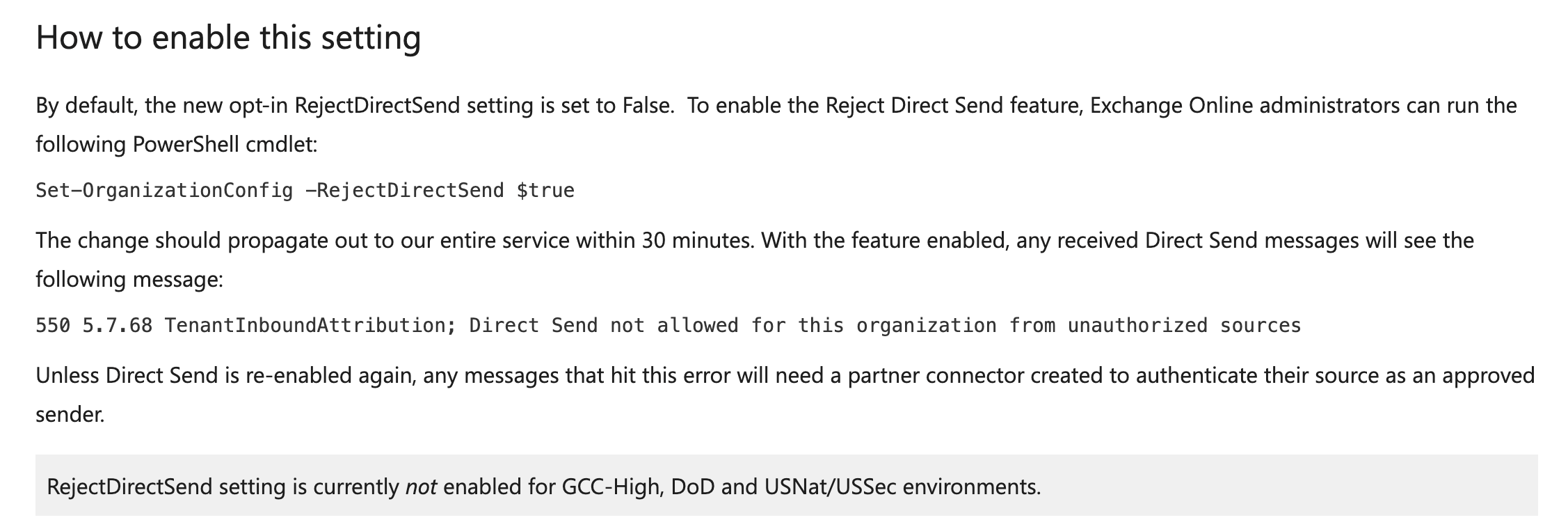
In 2025, Microsoft shipped a built-in toggle that closes one specific path into the trusted-relay category: Direct Send. Direct Send is the pattern where unauthenticated mail is injected into your tenant's smart host at tenant-com.mail.protection.outlook.com and treated as internal because the smart host accepts it. It's been documented as an active phishing vector — Varonis published the original abuse writeup after their team identified threat actors spoofing internal users at more than 70 organizations — and Microsoft's response was a new tenant-level setting that blocks it.
Enabling it is a single PowerShell command in Exchange Online:
Set-OrganizationConfig -RejectDirectSend $true
After it propagates (Microsoft documents up to 30 minutes), any unauthenticated Direct Send attempt is refused with:
550 5.7.68 TenantInboundAttribution; Direct Send not allowed for this organization from unauthorized sources
We've tested this in a client environment and it does what it says. Direct Send traffic gets refused, the smart host stops accepting unauthenticated injection, and the override path that depended on it closes.
The important caveat is that RejectDirectSend only closes the Direct Send vector. It doesn't restrict mail arriving through an authorized connector from a third-party gateway, and it doesn't change how Microsoft treats messages that arrive on a connector path it considers trusted. If your oreject events are originating from spoofed mail that successfully transits your Proofpoint or Mimecast gateway and then gets the trusted-relay treatment inside Microsoft, this setting won't stop them.
The practical sequence for a tenant running M365 behind a third-party gateway:
- Enable
RejectDirectSendas a low-cost first move. It closes the smart host abuse vector and the only thing it can break is a printer, scanner, or legacy app that was relying on Direct Send. Those need to be inventoried and either re-pointed to authenticated SMTP or allowed via a partner connector before the setting propagates. - Then implement the receive-connector lockdown for comprehensive coverage. This is the configuration that actually closes the gateway-relay path described in the rest of this post.
RejectDirectSend is the easier conversation with internal stakeholders. The connector lockdown is the conversation that actually matches the threat model for a tenant with a third-party gateway in front of M365.
What to check in your own environment
If MX points to a third-party gateway in front of M365, this affects you. Three things to check:
Pull a recent inbound header and look for oreject. Open any recent message received from an external sender into your tenant. In the Authentication-Results header, find the DMARC line. If you see action=oreject alongside compauth=none reason=451, the override is happening in your environment.
Test the spoof path. From an IP outside your tenant, send a message with a From address using your domain to a mailbox inside your tenant. If your gateway is configured correctly, it should reject the message at the gateway. If the gateway lets it through to Microsoft — for example because the spoofed sender matches an allow-listed relationship — check whether Microsoft delivers it or quarantines it. If it's delivered, examine the header for the oreject pattern.
Inventory your inbound connectors. In the Exchange admin center, list every connector that accepts inbound mail. Anything that isn't your primary gateway is a potential bypass path. The lockdown only works if every accepted inbound flow runs through the gateway.
If MX points directly to Microsoft, this specific bypass doesn't apply to your environment in the same way. The concerns there are different — primarily around direct send and the smart host, which is a documented abuse pattern with its own mitigation path.
Your DMARC record says reject. Does it actually?
Free 30-minute audit of how your policy is treated in the real world.
Book a 30-Minute ReviewWhy this isn't likely to get fixed
The override behavior is almost certainly intentional. It reads as a logic flaw rather than a technical flaw — a deliberate trade-off Microsoft made between strict protocol enforcement and the operational reality that a large share of legitimate mail flowing through Exchange Online would fail DMARC outright if Spoof Intelligence weren't permissive about it.
The internal trust heuristics that produce compauth=none reason=451 exist for the same reason: same-domain, same-tenant traffic gets through even when authentication is broken, because breaking that traffic would generate enormous support volume. Microsoft optimized for keeping mail flowing, and the cost of that choice is that a sufficiently determined attacker who can route mail through a path Microsoft considers trusted gets the same permissive treatment that the legitimate broken senders get.
The DMARC policy the domain owner published — the policy they're paying a vendor to monitor and enforce — gets quietly overridden. The receive-connector lockdown is, at the moment, the only reliable workaround. If you're running M365 behind a third-party gateway and you care about DMARC enforcement actually being enforced, this is the configuration you need.
The broader takeaway
DMARC p=reject is a policy request, not a technical enforcement mechanism. Receivers can choose to ignore it. Most of the time, most of them honor it. But there are documented exceptions across the major providers — non-compliant Japanese receivers continue to deliver failing mail, Google Workspace Groups have well-known bypass behavior, and Microsoft 365 has at least two paths (Direct Send abuse and the gateway-relay pattern described here) where the policy is silently overridden.
Treating p=reject as a binary — set it and the spoofing problem is solved — misses where the actual risk lives. The risk is in the gaps: the receivers that don't honor it, the relay paths that bypass it, and the reporting blind spots that hide the override from the domain owner. Closing those gaps requires understanding the specific configuration of your inbound mail flow, not just the value of the p= tag in your DNS record. That's the kind of work our email security practice was built around — finding where the policy you've published and the behavior of the receivers actually diverge.
Credit where it's due
This analysis wouldn't exist in its current form without the practitioners who pushed back in the comments of the original LinkedIn post. Ash Morin at dmarcian and Christian Schindler at NTx ran the careful reproductions that proved Groups alone weren't the cause. Aaron H. provided the clearest explanation of oreject and Spoof Intelligence we've seen anywhere. Ivan Kovachev and Levon Vardumyan filled in the composite-auth mechanics and the same-tenant-trust pattern. Cory Lesovsky confirmed the third-party gateway dependency from his own earlier disclosure to Microsoft. Sarkis Kamberian surfaced the receive-connector lockdown that turns out to be the actual fix.
The community thread on the original post is, in retrospect, more valuable than the post that prompted it.
At SH Consulting, we audit email infrastructure and DMARC enforcement for organizations sending email at scale. If you're running M365 behind a third-party gateway and want to verify whether the oreject pattern is present in your environment, book a call and we'll walk through it.