

Most people know DMARC as the protocol that protects your domain from spoofing and impersonation. That’s true, and it’s important. But in my opinion, the most underrated thing about DMARC has nothing to do with blocking bad guys. It’s visibility.
If your domain has a DMARC record and you’re monitoring the DMARC reports (the daily aggregate reports mailbox providers send back), you have something a lot of organizations don’t: a single source of truth for nearly every system that sends email as your domain. Every service, every team, every mail stream, and roughly how much mail each one is sending.
What Is DMARC Monitoring?
DMARC monitoring is the habit of actually reading the reports your DMARC record asks for. Once the record is published, mailbox providers like Gmail, Yahoo and Microsoft send you a report every day showing who sent email using your domain and whether it passed SPF and DKIM. Those reports show up as XML files nobody wants to open, so most teams point them at a reporting tool that turns them into a dashboard. Monitoring just means someone checks that dashboard regularly and acts on what the aggregate reports reveal.
This article isn’t going to walk through the technical details of DMARC. Instead, I want to tell you a story about our own company, and how a domain that started out sending email from exactly one place turned into something a lot more complicated.
It Starts Simple
When SH Consulting started out, our email setup couldn’t have been simpler. We sent everything from our primary domain, theshcompany.com, and every one of those messages went out through Google Workspace. One domain, one sending service. If you wanted to know what email our domain was sending, you just opened a few mailboxes.
As we grew, we added a CRM, HubSpot. Now our domain had two sources of mail: the day-to-day email from Google Workspace and basic newsletters and workflows coming out of the CRM. Still a pretty simple operation. You could keep track of both in your head without much trouble.
Mail Streams Start Piling Up
Two services didn’t stay two services for long. We added a SendGrid account. We experimented with Mailchimp. Each one made sense at the time, and each one was set up to send email as theshcompany.com.
This is how it happens at almost every company we work with. Nobody sits down and decides to build a sprawling email infrastructure. It just happens. Before you know it, you have a marketing team using one service, a sales team using another, application-based emails coming from a third, and the list keeps growing. Every one of them is sending email that carries your domain name, and every one of them affects your domain’s reputation.
The question becomes: who actually knows what all of these systems are doing?
Find every service sending as your domain
We set up DMARC reporting, monitor it and take you to enforcement.
Book a CallDMARC Monitoring as a Single Source of Truth
At SH Consulting, that person is me. As founder and CEO, I’m passionate about email security and email deliverability, and I’m not a fan of guesswork. I need to keep track of every single mail stream our domain is used for. I need to know how much mail we’re sending. And I need to know whether every one of those systems is properly configured and authenticated.
Because theshcompany.com has a DMARC record and a reliable DMARC reporting service behind it, I don’t have to chase down each team or log into each platform. I log into our DMARC dashboard and see every mail stream in one place. Here’s what that gives me:
- Every sending service. Google Workspace, HubSpot, SendGrid, Mailchimp, and anything else that sends as our domain, all listed in one view. The raw reports contain sending IPs and signing domains; the reporting tool is what turns those into service names.

- Sending volume per service. I can see roughly how many newsletter emails went out, how much sales outreach we’re doing, and how many application-based emails are being sent.

- Authentication status. I can see whether each service is passing SPF and DKIM in alignment with our domain, so a misconfigured system gets caught before it turns into a deliverability problem.
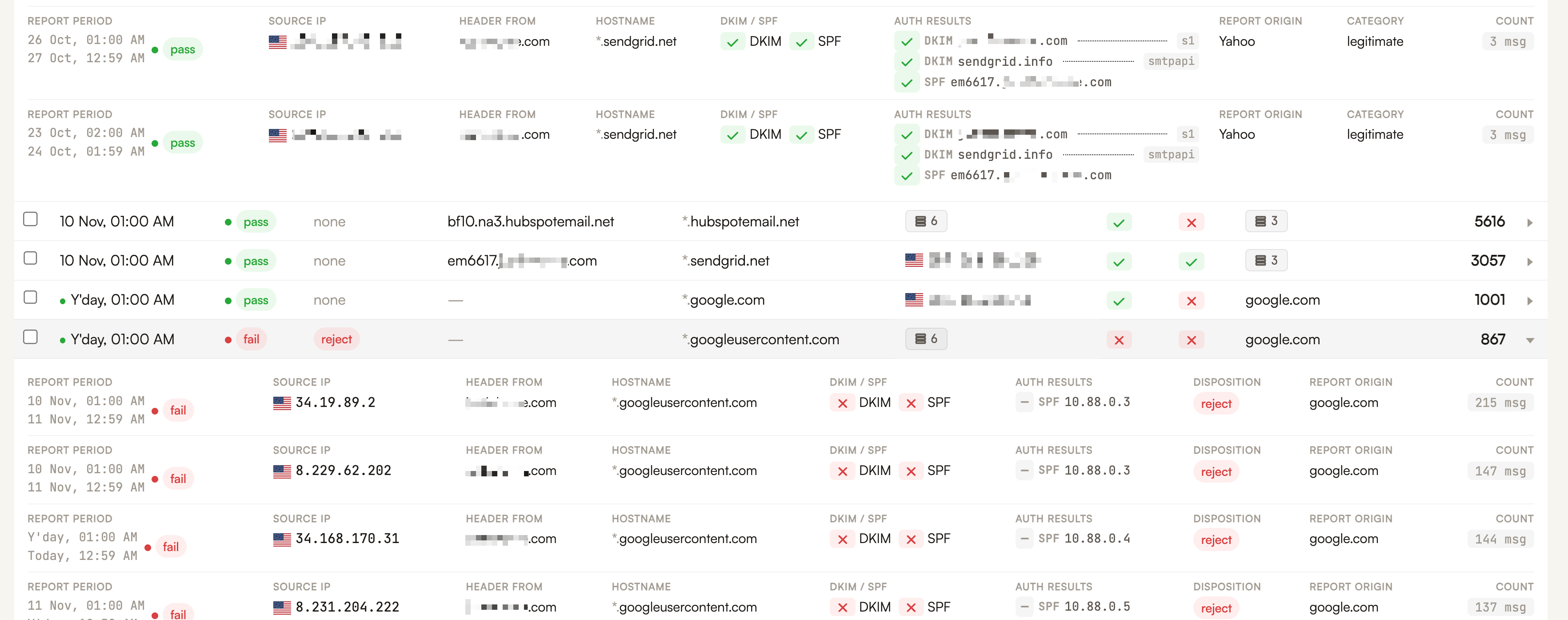
- Spoofing and impersonation attempts. When someone tries to send email pretending to be us, it shows up in the reports too.

That last point is the one DMARC is famous for. The first three are the ones most people don’t realize they get simply from publishing a DMARC record and monitoring the daily reports that come in.
Finding Every Email Sending Service Without DMARC Monitoring
Without DMARC, you’d have to catalogue every service the company uses to send email, which means asking every team what they’ve signed up for and hoping nobody forgets the tool they tried for a month last spring. At a larger company, with multiple teams, subdomains, and ESPs, that list gets long quickly. Then you’d have to log into each platform separately to pull sending volumes. Then you’d have to check the authentication setup on each one by hand.
It’s an arduous task, and it’s out of date almost as soon as you finish it. Things move incredibly fast in this industry. New tools get adopted, old ones get abandoned but never shut off, and a single team member can connect a new service to your domain in an afternoon. Keeping up with that manually is a losing battle.
With DMARC, the receiving mailbox providers do the cataloguing for you. Every time a message from your domain lands at Gmail, Yahoo, Microsoft, or anyone else that sends DMARC reports, it gets counted and reported back. If a system is sending as your domain to any of those providers, it shows up. The guesswork is gone.
Not sure what’s sending email as your domain?
Check your DMARC record for free.
Check my DMARC recordWhat This Means for Leaders
DMARC is great for protecting your domain from unwanted spoofing and impersonation. But not everyone is aware that DMARC is also the best map you’ll get of what your domain is being used for in the world of email.
If you lead a company or a team, and email is part of your day-to-day responsibility or an important part of how you succeed, two things should be true:
- Your domain has a DMARC record in place, with a reporting address.
- You have an effective DMARC reporting tool, and someone actually looks at it on a regular basis.
A DMARC record with nobody reading the reports is like a security camera that isn’t plugged into anything. The data is there, but it isn’t doing you any good.
If you don’t know every service sending email as your domain, or you’d like help getting DMARC monitoring set up the right way, SH Consulting can help. Our DMARC monitoring service covers everything from setup and monitoring all the way to policy enforcement.